
For years, I’ve been hearing about Winlink, an amateur radio system for sending email over shortwave frequencies. It’s become a standard tool for ham radio emergency communications, as it enables a properly equipped station to connect an emergency shelter, command post, or staging area to email even if the internet is completely wiped out in the disaster area. It’s also very popular with folks cruising on yachts, allowing them to send and receive updates from friends and family on shore while sailing across oceans.
As its name implies, Winlink was originally developed for Windows users, and one of the major pieces of software for it is still Windows-only. I had therefore assumed that it would be a pain to set up my Linux-only radio shack to use the system. It turns out it’s not too hard.
First, though, a warning. If you start doing searches on “Linux Winlink” and related terms, you’ll quickly find very thorough, detailed tutorials and troubleshooting guides about running Winlink on the Raspberry Pi. That’s great if you’re using a Pi, but if you’re running a real desktop with a standard Linux distribution, it’s not so great. The Pi uses a custom operating system and hardware, and is just different enough from, say, an Intel desktop, that those instructions will lead you astray. Be sure to filter whatever you find for the architecture you’re actually using. In my ham shack, I have an Intel-based desktop computer running Ubuntu 24.04. Here’s what worked for me, with some explanatory notes along the way.
The first order of business is picking a client application. Winlink itself is a global network of “gateway” stations set up to monitor certain frequencies 24/7. By connecting to one of these stations, “client” stations can upload and download their email. It’s a bit like logging into an old-school BBS. Installing client software on Linux is trivial. I chose Pat, an elegant application with simple installers for all three major operating systems. Just click the “Install” button on the front of the Pat site and follow the instructions.
Next, I needed a modem, which would convert Pat’s data stream into audio waveforms that can be sent over the radio. There are two types of modems: hardware and software. I actually have an old KAM Plus hardware modem that can use the Pactor-1 mode. Almost all Winlink gateways support Pactor-1, but it’s the slowest connection. In addition, getting the KAM Plus’s old-style serial ports connected to my modern computer and radio would require adapters and tinkering. There are newer modems available, but Pactor is a proprietary protocol, and the company that owns a monopoly on it, SCS, prices their products accordingly. A current-generation Pactor-4-capable modem offers robust links and screaming fast speeds (by HF digital standards), but costs twice what I paid for my main HF radio. So I’d be using a software modem.
Modern computers can easily generate the audio waveforms for complex HF digital modes. My ham shack is already set up for some of the popular ones, so the interfaces are all working fine. All I needed to do is pick a Winlink-usable software modem and install it.
Here I ran into another annoying problem. With Winlink, software modem development has been slow and uneven. There’s an open-source protocol called ARDOP that, by all reports, is even slower and less reliable than Pactor-1. The other option is VARA, a proprietary software package that appears to have been written in Visual Basic for Windows, with a user interface straight out of 1995. Besides being closed-source, it also costs $75 for the full-speed version. However, the “trial” version is free, and in 2025 VARA is pretty much the only practical choice for Winlink. I look forward to the day a well-supported Open Source project fixes this situation. In the meantime, I rolled my eyes and looked into installing VARA.
Because it’s Windows-only, VARA needs to run on a compatibility layer on Linux. The well-tested WINE project provides it. Their site has detailed instructions for installing WINE on Debian/Ubuntu systems, and that worked without a hitch on my ham radio machine. Gregory Haselden, KN4NKB, has a helpful blog post on installing VARA atop the WINE layer (or in a “bottle,” as it’s called), and again, I just followed the instructions. I picked up some other helpful hints from this page as well. Once everything was installed, VARA fired right up in its little window.
Pat has a decent documentation wiki, and between the wiki and the comments in Pat’s configuration file, I managed to set up a Winlink account (via Telnet) and then get Pat and VARA working together. The one bit that gave me trouble was getting the radio to transmit. I tried using my usual radio control solution, Flrig, which is part of the excellent Fldigi package, but couldn’t get it working for this. A key realization was that rig control is the responsibility of the Winlink client, not the modem. VARA was just generating waveforms and sending data to and from Pat. Pat was controlling (or failing to control) the radio.
Eventually I found a solution in the Pat wiki. Instead of Flrig, I switched to using Hamlib. Now, before a Winlink session, I just have to open a terminal and start the rig control daemon. In my case, the command is:
rigctld -m 1049 -r /dev/ttyUSB1 -s 38400 --vfoLet’s break that down. 1049 is the code for my specific radio model (Yaesu FT-710). To find the code for any other rig, the command is:
rigctl -l | grep <radio-model-number>If you don’t pipe the output to grep, you’ll get the list of all the radios hamlib supports, which will scroll on for many pages.
The next part of the command identifies the port the radio uses. To figure that out, try:
ls -l /dev/serial/by-idYou should see a file there that looks like the connection to your radio, and the long listing will show what port it’s connected to. If you haven’t used rig control at all before, you might also need to add yourself to the dialout group to have the right permissions:
sudo adduser <username> dialoutThe -s 38400 flag sets the baud rate for communicating with the radio. Check your radio’s settings or manual for that. Finally, and this was something I had to discover on my own, use the –vfo flag or Pat will bark at you about being unable to set the frequency.
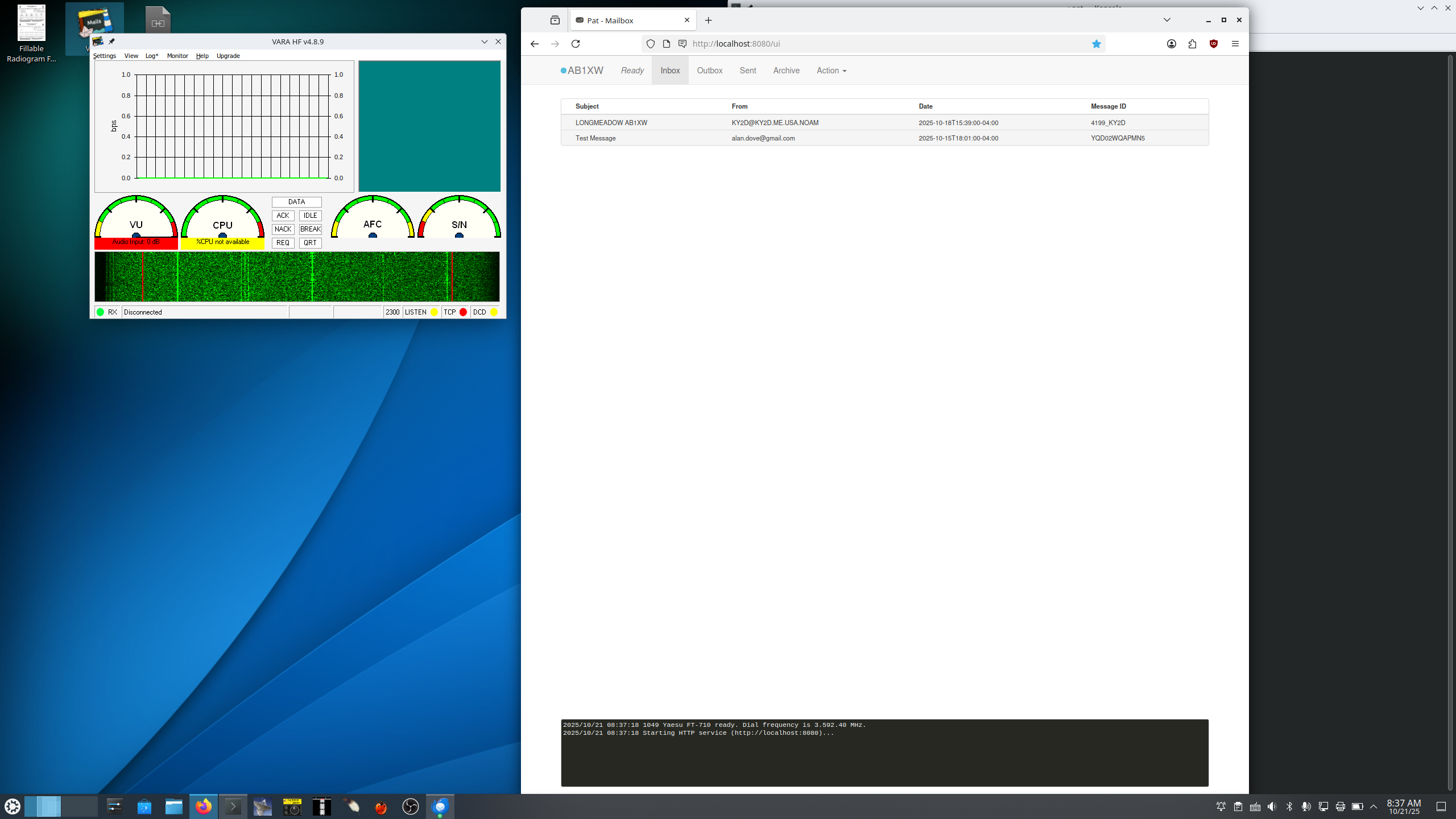
With that, everything finally worked. It’s possible to use Pat exclusively from the command line, but the web interface is much easier. So now that it’s all set up, I just turn on the radio and computer, start VARA with the desktop shortcut I created when I installed it in WINE, then open two console tabs. In the first one, I enter my rig control command:
rigctld -m 1049 -r /dev/ttyUSB1 -s 38400 --vfoI leave that running in the foreground. In the second tab:
pat httpAgain, I leave it in the foreground. Then I launch Firefox and navigate to localhost:8080. That’s now my Pat/Winlink interface, and it acts pretty much like a webmail client. Of course, I could background the console commands or even start rig control as a system service at boot, but then I’d have to remember to turn it off before launching Flrig, which I use for rig control in other modes. With the console tabs open to running processes, I always know there’s unfinished business after closing Pat and VARA.
Now, I’m regularly accessing my area’s hub station for digital radiograms, and have also confirmed that I can send and receive email from regular Winlink gateways.